
01
Upload one clear couple photo
Pick a single JPG, PNG, or WebP picture showing both partners clearly without sunglasses or heavy shadows.
Turn one couple photo into a 6-second 9:16 envelope-to-gazebo pop-up wedding invitation clip with soft garden sound and clean space for event text.
Choose settings and write your own prompt on another model page.
Build a short vertical save-the-date reveal from one well-lit couple photo. An embossed stationery envelope opens upward into a paper garden gazebo framing your printed portrait, with a soft paper-rustle soundtrack and an empty lower card panel where you can overlay exact names, date, and venue afterward.
Paced for quick messaging shares, pairing tactile paper stationery with an uncluttered lower margin so real wedding text stays crisp.
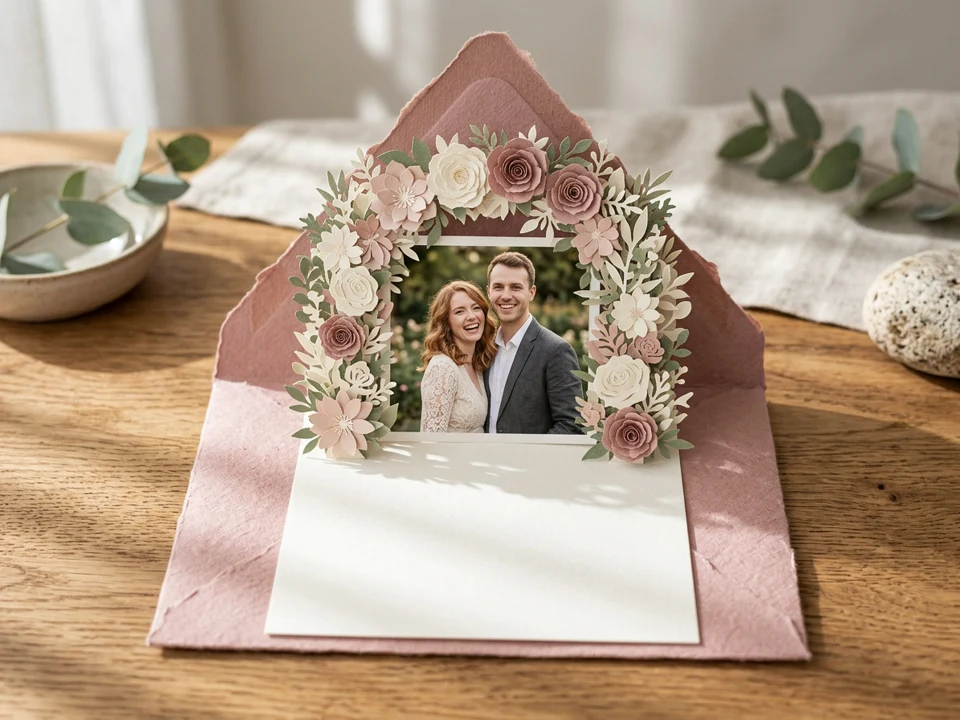
Use a front-facing photo taken in even daylight so the printed card keeps facial features and side-by-side placement clear as the envelope opens.
The preset lifts the envelope flap and expands layered paper blossoms and columns around your portrait over 6 seconds with subtle paper-fold sound.
Because AI-rendered lettering often distorts names or dates, the prompt asks for an unprinted ivory margin where you type exact details in your editing app.
Pick a single JPG, PNG, or WebP picture showing both partners clearly without sunglasses or heavy shadows.
Use Extra details to request dusty rose, ivory linen, sage leaves, or soft morning garden lighting.
Check the credit quote, review both faces and blank margin after generation, then add names, date, venue, and RSVP in an editor.
Questions before generating
No. This preset accepts one image slot only, so upload a single photo that already includes both people standing or sitting together.
No. Keep names and dates out of the prompt so it asks for an unlettered lower panel. Unlike the sample preview (which shows embossed “A&M” and “Save The Date” lettering without a couple portrait), your 6-second result applies the preset to insert your photo inside the pavilion—always inspect the clip before adding exact text in your editor.
It generates a 6-second 9:16 clip at 720p via Seedance 2.0 Mini reference-to-video with gentle paper rustling and quiet garden ambience enabled. Add licensed music separately if desired.
Exact facial likeness and intricate paper-cut geometry are not guaranteed. Always watch the full 6-second result and check the credit estimate before starting a new run.
Upload one couple portrait to generate a 6-second 9:16 pop-up wedding invitation clip ready for your own date and RSVP overlay.